
The storefront, not the platform



get_products. The loyalty data powers closed-loop attribution reported through standard delivery metrics. The store locations are modeled as catalogs with catchment areas for proximity targeting.

Concept mapping
Each retailer is a separate sales agent. Their media offerings are modeled as products. The buyer’s brand identity carries the product catalog for SKU-level creative rendering. Account relationships between brands and retailers are managed via
list_accounts and account on media buys — see Accounts & Agents.
The product spectrum
Retail media networks offer diverse product types — not just sponsored listings. All share theretail_media channel, but differ in format, pricing, and creative requirements. Daniel modeled ShopGrid’s full portfolio as separate products so buyer agents can mix and match across the funnel.
Sponsored product listings
The simplest commerce media product. The retailer renders the creative from the buyer’s product catalog — no custom creative upload needed. Pricing is typically CPC.catalog_types field declares what catalog types this product supports. The catalog_match field tells the buyer which of their catalog items are eligible on this retailer. Buyers use these values as catalog selectors (gtins, ids) when creating media buys — the same way publisher_properties lists available properties for refinement. Sellers can include matched_gtins, matched_ids, or both.
Sponsored product listings are catalog-rendered — the retailer pulls title, price, image, and rating from its own catalog data matched via GTIN. Enhanced product content (comparison charts, lifestyle galleries, brand story modules) and brand stores are complementary content strategies managed through the retailer’s content systems, not through the ad buy.
Key characteristics:
- CPC pricing with auction-based bidding
platform_managed: true— the retailer provides always-on purchase attributionsupported_targets— tells buyers which target kinds are available when settingoptimization_goalson packagestemplates_available: true— the retailer renders creatives from catalog dataaction_sourcesincludesin_storefor omnichannel attribution
On-site display and video
Display and video ads on retailer properties, targeted using retailer first-party shopper data. Buyers provide standard creatives. Higher minimums and CPMs reflect the value of retailer audience data and guaranteed placement.Off-site audience extension
The retailer uses first-party purchase data to target audiences on third-party inventory — extending reach beyond the retailer’s own site. The product still belongs to theretail_media channel because the buying context is the retailer’s data asset.
Premium placements
Homepage takeovers, category sponsorships, seasonal event placements. These high-visibility positions are sold at fixed rates with guaranteed delivery — often booked well in advance.placements array so buyers can assign different creatives to different positions within the same product.
In-store digital
Digital screens in physical retail locations — checkout lanes, end-caps, entrance displays, and waiting areas. These bridge the digital-physical gap, with measurement tied to in-store purchases. When paired with a synced store catalog, in-store digital products can target specific locations and show inventory-aware creative. In-store is where retail media networks have inventory that no one else can replicate. A retailer with thousands of physical locations has screens at the point of purchase — reaching shoppers while they’re browsing aisles, comparing products at the shelf, and waiting in line. Many of these shoppers never see digital ads elsewhere: they shop in-store exclusively, making them unreachable through online channels.Beyond these examples
Retail media portfolios often extend beyond the five product types above. Sponsored brand ads — a headline, brand logo, and 2-3 featured products — sit between sponsored product listings and display, with a custom headline from the buyer and catalog-rendered product tiles. Digital coupons and cashback offers tie directly to purchase and don’t fit neatly into impression-based models — they can be modeled as products with CPA pricing andconversion_tracking. Sponsored placements in retailer email newsletters and app push notifications are high-performing, low-funnel products modeled the same way as on-site display with different format_ids. Shoppable video — where products are tagged within the video frame and viewers can add items to cart — combines video formats with catalog-rendered product overlays. Keyword-level search sponsorships, sampling programs, and recipe integrations each have distinct economics but follow the same pattern: a product with the right pricing model, format, and measurement declarations.
End-to-end workflow
Closed-loop attribution
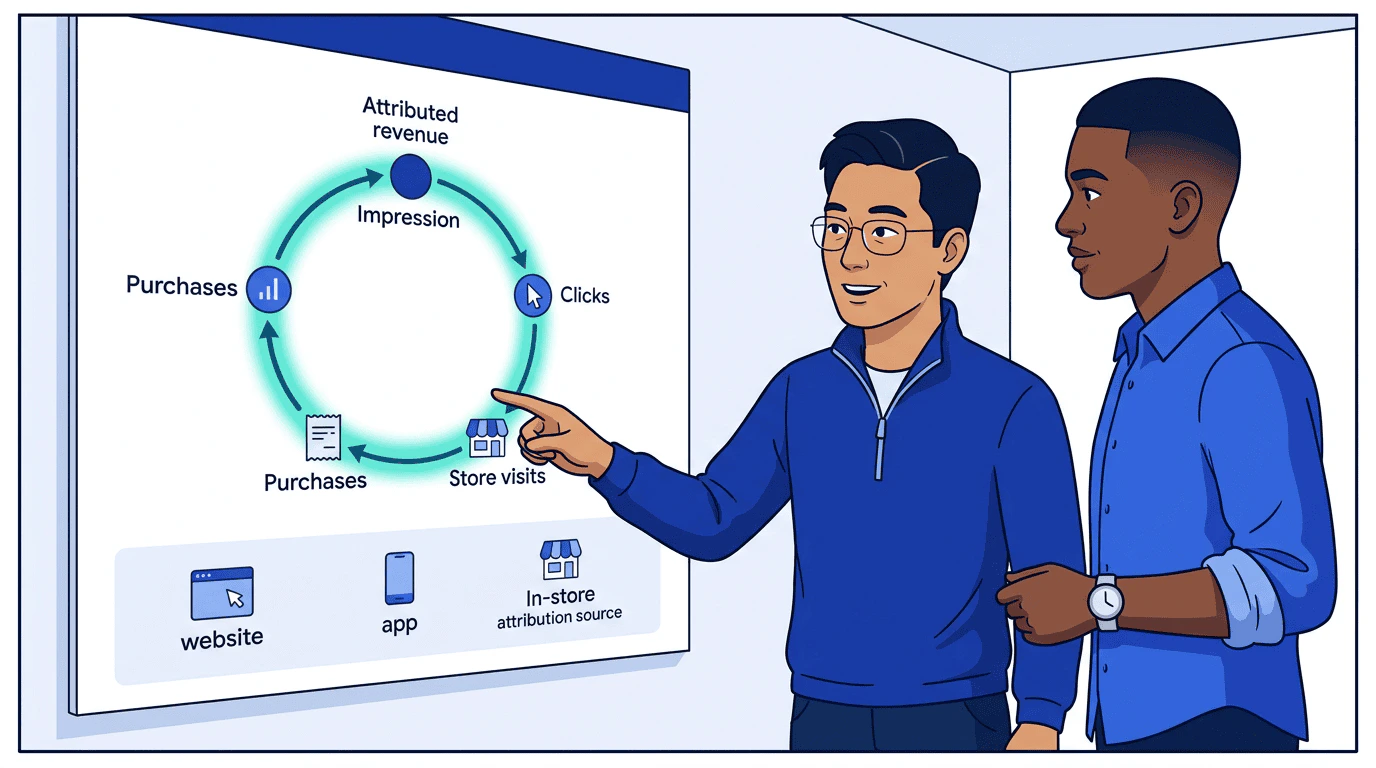
How products declare it
Products signal closed-loop capability through two fields:reporting_capabilities.available_metrics declares which outcome metrics the product reports. Closed-loop retail media products typically report conversions, conversion_value, roas, cost_per_acquisition, units_sold, new_to_brand_rate, and incremental-lift metrics like incremental_sales_lift and conversion_lift. The methodology and attribution window flow through the qualifier slot on committed_metrics and metric_aggregates (attribution_methodology: "deterministic_purchase" for retail-media closed loop; attribution_window: { interval: 14, unit: "days" } for the 14-day match window).
outcome_measurement field is deprecated but continues to work for one minor. Existing payloads:
conversion_value (the standardized name for “attributed sales”) in available_metrics plus the matching qualifier on committed_metrics. Migrate by populating both fields during the transition window; remove outcome_measurement at the next major.
conversion_tracking declares action sources and whether the retailer manages measurement:
platform_managed is true, the retailer provides always-on measurement. No buyer-side pixel or event source configuration needed.
Different retailers use different attribution windows (e.g., 14-day click vs. 7-day click). The
attribution_window in delivery responses makes this transparent so buyers can normalize ROAS comparisons across retailers.Key delivery metrics

Differences from traditional media buying
Best practices
For retailers: standing up an agentic storefront
The default retail media playbook — build a self-service platform, hire a sales team, grow managed service revenue, eventually build a DSP — works for the largest retailers. For everyone else, it means years of engineering investment competing against platforms with orders-of-magnitude more resources. An agentic storefront changes the economics. Instead of building a platform that brands must learn, you expose your inventory through a standard protocol that buyer agents already speak. Your engineering investment goes into your actual differentiators — data quality, measurement accuracy, inventory breadth — not into dashboard UX.- Model product types separately — sponsored products, on-site display, off-site, premium placements, and in-store digital should be distinct products with appropriate pricing and formats. This is how buyer agents comparison-shop across retailers.
- Lead with your data — declare
outcome_measurementwithdeterministic_purchaseattribution andconversion_trackingwithplatform_managed: true. This is what buyer agents optimize against. Retailers with weak measurement lose to retailers with strong measurement, regardless of UI quality. - Expose your physical footprint — provide store catalogs with catchment areas so buyer agents can target by geography. In-store digital inventory is something no online-only platform can offer. Make it discoverable.
- Return
catalog_matchon sponsored product listings so buyers see which GTINs/SKUs are eligible. This is the equivalent of a sales rep saying “we carry 3 of your 1,200 products” — but it happens automatically at query time. - Include
attribution_windowin delivery responses — buyers comparing across retailers need to know your lookback windows and model. - Report
by_action_sourceto show omnichannel impact — website, app, and in-store conversions. The cross-channel view is unique to commerce media and drives budget allocation. - Use proposals — return recommended budget allocations across product types with
get_productsresponses. This encodes your media planning expertise into the protocol, replacing the sales rep conversation with structured data that buyer agents can evaluate. - Set
channels: ["retail_media"]on all commerce media products so buyers can filter by channel.
For brands
- Set up accounts early — use
list_accountsto confirm your billing relationship with each retailer before placing buys - Sync product and inventory feeds early — product and inventory catalogs should be synced to the account before creating buys. Inventory feeds update hourly; product feeds daily.
- Reference retailer store catalogs in targeting — the retailer’s store locations and catchment areas are platform-side data. Use them for proximity targeting without needing to sync your own store catalog.
- Use
optimization_goals— set event goals withcost_perorper_ad_spendtargets on packages to let the retailer optimize delivery against their purchase data - Use catalog selectors strategically —
gtinsfor specific products,tagsorcategoryfor broad promotions - Budget across the funnel — sponsored products for conversion, on-site display for awareness, off-site for reach extension
- Compare attribution windows — use
attribution_windowin delivery reports to normalize ROAS across retailers with different lookback windows
Related documentation
- Account state — How catalogs, event sources, and campaigns build on the account
- Accounts & Agents — Account setup and billing relationships
- Media Channel Taxonomy —
retail_mediachannel definition - Media Products — Product model reference
- Catalogs — Product, inventory, store, and promotion feeds
- Brand identity — Product catalog and brand identity
- Pricing Models — CPC, CPM, flat rate details
- Optimization & Reporting —
optimization_goalsand conversion optimization - Delivery Reporting — Commerce attribution metrics
- Targeting — Brief-based targeting approach