
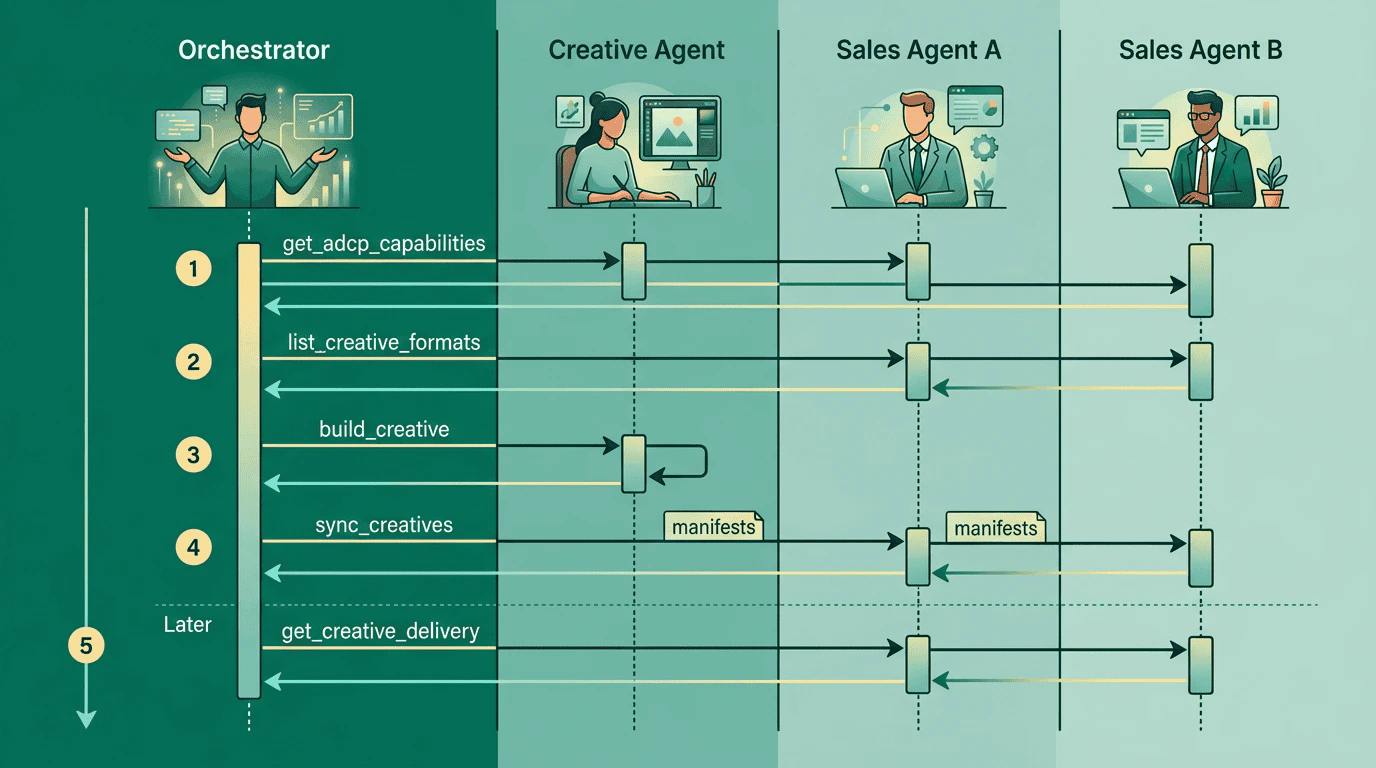
The orchestrator role
An orchestrator is a buyer-side system that connects to multiple AdCP agents and coordinates creative workflows across them. It does not implement the Creative Protocol itself — it consumes it. Typical orchestrators include agency platforms (think a holding company’s internal toolchain), brand-side creative hubs, and multi-publisher campaign management systems. The orchestrator’s responsibilities:- Discover what each connected agent can do
- Route creative requests to the agent best suited for the job
- Distribute finished creatives to every seller that needs them
- Aggregate delivery data across agents into a single reporting view
Capability discovery
Before routing any requests, the orchestrator needs a map of what each agent supports. Callget_adcp_capabilities on every connected agent and index the creative section of each response.
Cache this map and refresh it periodically — the
last_updated field on the capabilities response tells you when an agent’s capabilities last changed.
Format discovery across agents
Calllist_creative_formats on each agent in parallel. Each agent returns a formats array where every format includes a format_id with an agent_url identifying which agent owns that format definition.
agent_url in each format_id distinguishes them. At routing time, prefer the agent whose capabilities best match the request (a generative agent for briefs, a library agent for tag retrieval).
Some agents also return a creative_agents array pointing to additional agents the orchestrator can query. Follow these references to discover formats from agents not already in your connection list, but track visited URLs to avoid infinite loops.
Routing creative requests
Use the capability map and format catalog to route each request to the right agent. Brief with no existing creative — the brand team provides creative direction but no assets. Route to an agent withsupports_generation: true. The agent accepts a natural language brief via build_creative and returns a manifest with generated assets.
Existing creative needs resizing — the buyer has a manifest for one format and needs it adapted to another. Route to an agent with supports_transformation: true. Pass the existing creative_manifest and a target_format_id for the desired output.
Retrieve tags from an ad server — the creative already exists in a platform library. Route to the agent with has_creative_library: true that hosts it. Pass the creative_id and target_format_id to build_creative to get a serving tag.
Target format determines the agent — when the request targets a specific format (CTV, DOOH, a publisher’s proprietary unit), route to the agent whose format_id.agent_url matches. That agent is the authority for that format and will produce the most reliable output.
When multiple agents qualify, prefer agents that combine capabilities. A sales agent with supports_generation: true and has_creative_library: true can generate a creative and store it in one step, avoiding a separate sync.
Build once, distribute to many
The core multi-agent workflow: generate or build a creative once, then distribute it to every seller that needs it.Step 1: Build the creative
Callbuild_creative on your creative agent to produce a manifest:
creative_id to the result — this ID stays consistent everywhere you send the creative.
Step 2: Sync to each seller
Callsync_creatives on each sales agent, using the same creative_id and concept_id:
creative_id (acme_holiday_300x250) and concept_id (concept_holiday_2026). These become the keys for cross-agent correlation later.
Step 3: Track approval status
Each seller reviews the creative independently. Polllist_creatives on each agent to check status:
status field on each creative tells you where it is: processing, pending_review, approved, rejected, or archived. Build a consolidated view:
A creative can be approved by one seller and rejected by another — each seller applies its own policies. See creative review for how status transitions work.
Cross-agent delivery aggregation
Once creatives are live, callget_creative_delivery on each agent to collect performance data. The response includes a creatives array with variant-level breakdowns:
Correlating across agents
creative_id is the primary correlation key. Because you assigned the same creative_id when syncing to each seller, you can match delivery records across agents directly.
concept_id groups related creatives. When you need aggregate metrics for the “Holiday 2026” campaign across all sizes and sellers, filter by concept_id on each agent’s list_creatives to get the set of creative_id values, then pull delivery for all of them.
variant_id is scoped to a single agent and creative. Two agents may independently assign the same variant_id string. When aggregating variants across agents, prefix with the agent URL to create a globally unique key: https://sales.pinnaclemedia-example.com/var_a1b2c3.
Normalizing timezones
Each agent reports in its own timezone viareporting_period.timezone. Before summing metrics across agents, convert all timestamps to a common timezone. The timezone field uses IANA identifiers (America/New_York, Europe/London, UTC), so standard timezone libraries handle conversion.
concept_id as a correlation key
Concepts are buyer-assigned groupings — the protocol does not enforce them. The orchestrator decides what constitutes a concept and assigns the concept_id consistently when syncing related creatives to different agents.
A typical mapping: one concept per campaign idea, with multiple creatives per concept (different sizes, formats, or variations).
concept_id at sync time via the concept_id field on each creative in sync_creatives. Use it to:
- Filter
list_creativeswithconcept_idsto see all creatives in a concept on a given agent - Group
get_creative_deliveryresults by concept for roll-up reporting - Track approval status across sizes and sellers for the same campaign idea
Error handling across agents
Multi-agent operations produce partial failures. One seller accepts a creative while another rejects it, or an agent is temporarily unreachable. Design for this from the start.Partial sync failures
sync_creatives returns per-creative results. Check the action field on each item in the response:
errors instead of creatives, the entire operation failed (authentication, network, invalid request). Retry the whole call.
When individual creatives fail within a successful operation, handle them individually — fix the issue and re-sync just the failed creatives using the creative_ids filter:
Agent unavailability
When an agent is unreachable, the orchestrator should:- Record which syncs or queries failed and for which agent
- Continue processing other agents — do not block the entire workflow
- Retry failed agents with exponential backoff
- Use
idempotency_keyonsync_creativesso retries are safe
Inconsistent approval states
A creative approved on one seller and rejected on another is normal, not an error. The orchestrator should surface this clearly to the campaign team rather than treating it as a failure. If the rejection is due to a fixable issue (wrong aspect ratio, missing click URL), update the creative and re-sync to the rejecting seller only.Rate limiting and concurrency
When calling many agents in parallel (common for cross-seller sync and delivery aggregation), expect that agents may rate-limit requests. Handle this with standard HTTP patterns:- Respect
429 Too Many Requestsresponses and theRetry-Afterheader - Use exponential backoff with jitter for retries
- Set reasonable concurrency limits per agent (start with 5 concurrent requests per agent, adjust based on observed behavior)
- Log rate-limit events per agent to identify which agents need lower concurrency
429 with a Retry-After header; others may slow responses without explicit signaling. Build your orchestrator to handle both patterns.
Specialized format orchestration
The patterns on this page apply to all creative formats — display, video, CTV, conversational, audio, DOOH. The protocol-level operations (list_creative_formats, sync_creatives, get_creative_delivery) work identically regardless of format type. The format-specific differences are in asset requirements and preview behavior:
- CTV formats produce multi-render previews (primary video + companion). See CTV and connected TV.
- Conversational formats return
interactive_urlin previews for sandbox testing, and variant manifests include conversation transcripts. See Conversational formats. - Feed-native/social formats have platform-owned chrome that wraps buyer assets at render time. See Pattern 4.
format_id.agent_url and capability map handle that. Format-specific knowledge matters only when interpreting previews and delivery data for display to campaign teams.
Next steps
- Orchestrator design patterns — State machines, persistence, and retry patterns for multi-agent systems
- Creative libraries and concepts — Managing creatives in a single agent’s library
- Creative capabilities on sales agents — When the seller manages both media and creative
- Generative creative — AI-powered creative generation workflows
- Specification — Full Creative Protocol specification and interaction models